+34 934 356 489
  bcn@avisualstudios.es

Streaming
How to stream on multiple streaming platforms

If you’re considering starting to stream on multiple platforms, in today’s article we explain how to broadcast from various streaming platforms. By the way, you can learn more about one of the most popular forms of streaming in our article “Webcast, the new recording format that’s taking the world by storm“.
Streaming is one of the most popular formats on the internet. Although many companies, influencers, and users share different live content, it’s not easy to do if you want a professional-level result. Moreover, currently a user has, on average, at least two and a half social media profiles, which further complicates the task.
Introducing the world of streaming

Streaming is, basically, the live transmission of video directly through the internet. You should know that streaming on multiple platforms is not as easy as uploading a video to your social networks, and the main complication is doing it simultaneously on different platforms, one of the main goals of every user, as it allows reaching a larger number of viewers and thus gaining more followers.
In the audiovisual sector, conducting a stream is far from the homemade methods that many users often employ. To do it professionally, you must have, at least, the following equipment:
- 1 digital video camera
- 1 capture device
- 1 computer
How to work on multiple streaming platforms

Basically, there are two ways to stream on multiple platforms: With Software and without Software. Each of them will require, in addition to the equipment mentioned above, others that complement the task.
- Streaming without software. It’s a method quite used in the audiovisual sector and is based on transmitting the video directly to the streaming platform, although we can only apply it if the platform itself allows live broadcasting from the computer. Additionally, within this, there are two ways to do it:
- With a single camera: If we only need one camera to stream, the task is simpler. You should know that the HDMI ports on computers are output ports, so if it’s not compatible, we’ll need to send the signal to our capture device and pass it to the computer through the USB port. By the way, it should always be USB 3.0. From here, we’ll go to the platform and do the live transmission. But to do it on multiple streaming platforms, we’ll need to send the capture signal to a Splitter. A Splitter is a device used to take an input signal and distribute it through different outputs. Thus, each of our outputs will go to a different computer, having one for each platform on which we want to stream.
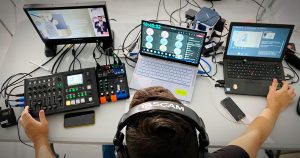
- With multiple cameras: The operation is identical to the previous one, with the main difference being that we’ll need a mixer to work with the different cameras. With it, we’ll control which camera we’re broadcasting from at that precise moment.
- Streaming with software: There are countless platforms that perform “restream”. This concept is based on transmitting a video through the program on multiple content platforms. If we choose this option, we’ll need to do exactly the same as in the previous method, but we’ll only need a single computer.
The camera will send the signal to the capture device and then it will go to the computer or the mixer. From the computer, we’ll use the program to make the live connection. One of the most used programs and, for many, the best streaming platform is OBS. Open Broadcaster Software is an open-source program for recording and broadcasting videos over the Internet. Its main advantage is that it’s very intuitive and, like all free software, it’s completely free.
With it, you can edit scenes, sources, control different audio channels, and make transitions between scenes. In addition to live broadcasts, you can record the video at the same time.
You should know that there are other programs for multiplatform content streaming. They are not open source, but many offer freemium plans with interesting features, so if you’re looking for free streaming platforms, they will be a good option. The most well-known are:
- Streamlabs
- XSplit
- vMix
- Lightstreams
Aspects to consider before recording a stream
Find out if your camera is suitable for streaming. For example, most DSLR cameras are not designed for live broadcasts, as they don’t capture clean audio and don’t provide an optimal signal through the HDMI port.
Make sure you can send the data correctly. Computer HDMI ports are for output and therefore we cannot input data. Use a capture device with HDMI input and USB 3.0 output, which allows for optimal reception.
Capture audio externally. Taking audio directly from the camera is too risky. Use a microphone and send the audio signal directly to the mixer. If you don’t have this first option, you can always put the receiver on the camera.
Properly illuminate the area. Use lighting equipment that provides your streams with appropriate and professional lighting. In the Webcast Zone of Avisual Studios, we use a lighting system on rails composed of 8 Cineroid FL 800 LED panels.
Prepare your content conscientiously. Have the content you’re going to transmit in the stream well-prepared, as well as how you’re going to present it on camera, since the format doesn’t allow for errors.
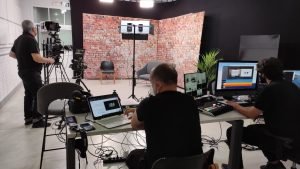
If you want to learn more about how to stream on various streaming platforms, visit the Webcast Zone of Avisual Studios.
If you liked the article, tag us and share it on your social networks!